

Vehicle chargers and mounts
Keep your mobile receipt printer powered and within easy reach while the vehicle is working. We supply 12 V chargers, cab mounts and fitting options for drivers, route sellers and field teams across South Africa.
What vehicle chargers and mounts are for
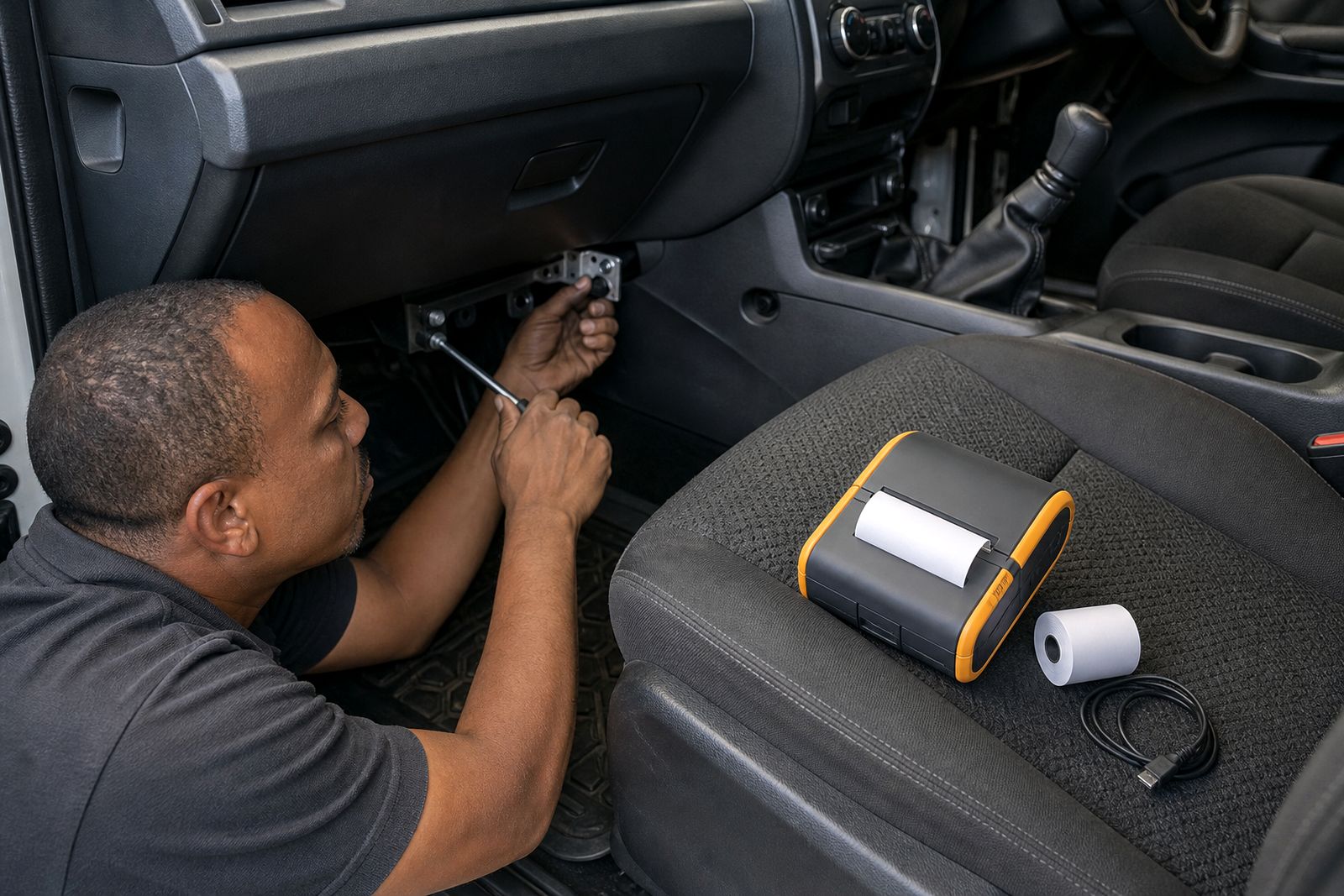
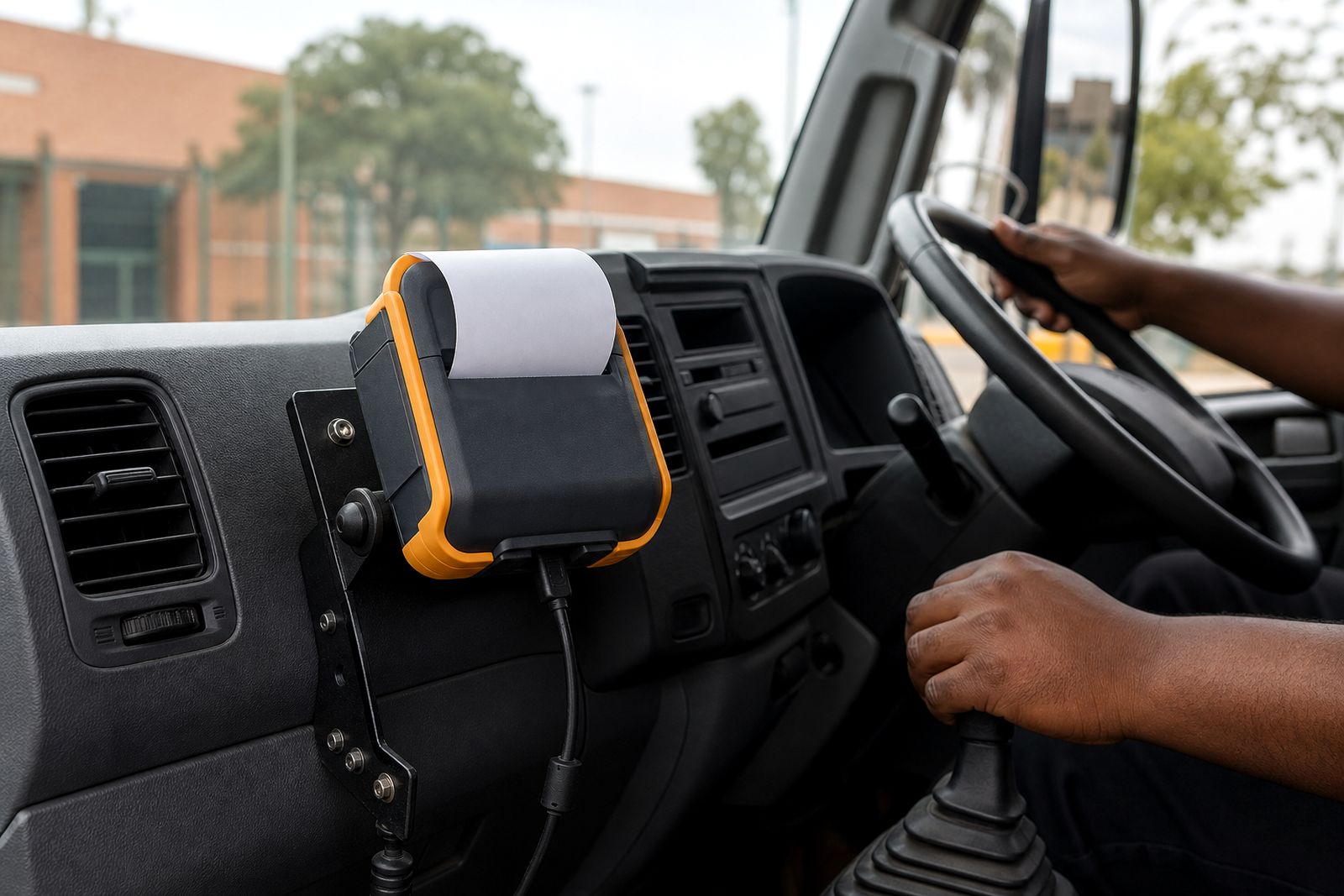
Vehicle chargers and mounts make a mobile receipt printer easier to use during a working shift. The charger keeps the printer battery topped up from the vehicle’s 12 V supply, while the mount gives the operator a fixed place for the printer inside the cab. That helps with faster stops, fewer dropped units and less cable strain when the driver is in and out of the vehicle all day.
These setups suit delivery vehicles, route sales bakkies, service vans, parking teams and inspection crews who need printed receipts or slips on the road. In local conditions, where heat, dust and vibration can be hard on equipment, a proper mount and the correct charging lead matter more than many buyers expect.
- 12 V charging from a vehicle socket or fixed fused feed
- Cab brackets for dash, partition or side console mounting
- Printer cradles sized for compact and mid-size receipt printers
- Options for use with belt clip removal or dock-and-release handling
Sizes, options and working limits
We match the charger and mount to the printer size, paper width and how the crew actually works. Most mobile receipt printers in this category use either 58 mm or 80 mm thermal paper, and the mount needs enough clearance for paper loading, charging connection and lid opening. A compact 58 mm unit usually suits lighter cabs and frequent carry-on-person use, while an 80 mm unit needs a stronger bracket and a little more elbow room.
Vehicle chargers are supplied for 12 V systems. They are intended to maintain charge during normal route work, not to recover a fully flat battery in a short stop. If a team prints heavily all day, the right battery capacity and shift pattern still matter. Chargers and brackets also have limits on vibration and placement, so they should not be fitted where the unit can strike the gear lever, airbag path or the driver’s knees.
- Compact cradle options for 58 mm mobile printers
- Larger cradle options for 80 mm mobile printers
- Straight and coiled charge leads depending on cab layout
- Mounting arms with short, medium or adjustable reach
- Quick-release printer holders for frequent loading and unloading
Where a vehicle is exposed to corrugated roads, farm tracks or constant stop-start vibration, we normally recommend a firmer bracket with fewer moving joints. It costs less in the long run because the printer stays put and connectors last longer.
Where these setups work best, and where they do not
A mounted printer works best where the operator needs repeat access at each stop and where a printed receipt improves handover, proof of delivery or cash control. Courier drivers, route sales teams and mobile service crews often benefit because the printer is always charged and always in the same place. In automotive sales and parts delivery, it also helps keep the cab organised and speeds up customer handover.
It may not be the best choice where the operator mostly works on foot far from the vehicle, or where the printer must move between many people in one shift. In those cases, a belt or shoulder carry setup can be better than a fixed cab mount. It is also not ideal for open vehicles or positions exposed to direct rain, wash-down water or coastal spray without protection. Salt air around Durban, Gqeberha and Cape Town can shorten connector life if the setup is left damp or dirty.
If your team changes vehicles often, tell us that early. A portable charging arrangement may suit better than a fixed bracket in every cab, and it can save fitting time.
Vehicle and installation requirements
Before supply, we need to know where the printer will sit in the cab and how power will be taken. Some customers use the standard 12 V accessory socket, while others prefer a fixed fused feed for a tidier installation. The best position is usually within easy reach of the seated operator but clear of steering, handbrake movement, airbag deployment zones and passenger legs. In many fleets, a side console, partition panel or dash-adjacent mounting point works well.
We do not carry out software work, and we do not supply handheld computers, but we can help match the printer mounting arrangement to the phone or handheld already used by your drivers. If the app prints by Bluetooth, the printer should stay close enough for stable pairing and not be buried behind metal panels.
- Vehicle type, for example hatch, sedan, bakkie, van or truck cab
- 12 V power point location or whether a fixed feed is planned
- Printer model size and whether it uses 58 mm or 80 mm paper
- Who needs access, driver only or driver and assistant
- Whether the unit is removed from the vehicle between shifts
Installations should comply with your fleet rules and any municipal or employer safety requirements. The bracket must not block visibility or interfere with controls, thats a basic but important point.
Care in daily use
A charger and mount need simple routine care to stay reliable. Dust in the cab, paper debris and heat build-up can affect both the printer and the connector. Drivers should avoid yanking the lead out by the cable, storing loose coins around the power plug or forcing the printer into a cradle that does not match its shape. Those small habits are often what shorten service life.
In summer heat, parked vehicles can become very hot, especially in Gauteng and inland depots. If possible, remove the printer from direct sun when the vehicle stands for long periods. In coastal areas, wipe down exposed mounting hardware and charge contacts more often to reduce corrosion.
- Keep charge contacts clean and dry
- Check bracket screws and clamp points regularly
- Do not trap cables in doors, seat rails or sliding trays
- Replace torn protective sleeves or loose clips before they fail
- Store spare thermal rolls out of heat and sunlight
What to tell us when you enquire
The quickest way to get the right vehicle charger and mount is to send clear practical details through our contact page. We need enough information to match the printer, the power arrangement and the cab space. Photos of the cab and the current printer position are very useful, especially where space is tight or where a phone holder, radio unit or partition already takes up room.
Please include the printer model you use, the paper width, how many vehicles are involved and whether the operator prints while seated or after stepping out. Also tell us if the printer must stay mounted all day or if it is clipped off and carried into the customer site. If your team works long hours with frequent stops, mention that too, because charging duty and mount strength can differ a lot from one route to the next.
We supply nationwide from Midrand and can help you choose a practical setup for local delivery fleets, route sales teams and field staff who need printed receipts on the move.
What our Mobile Receipt Printers customers say
Verified Google reviews
Questions we get asked
Can you match a charger and mount to the printer we already use?
Yes. Tell us the printer model, paper width, how it connects to your phone or handheld, and where it needs to sit in the vehicle.
Do these mounts suit every vehicle?
Not every cab has the same space or safe fixing points. We check the vehicle layout, driver access and power position before recommending a mounting option.
Do you supply handheld devices or repair other printer makes?
No. We supply mobile receipt printers, paper, chargers, mounts and carry accessories, and we help customers choose the right fit for their existing setup.
Also worth a look
Tell us about the job
Send sizes, materials and where you are through our contact form, and we will come back with the practical options.
Open the contact form